
Kia Optima DL3: Seat / Front seat adjustment - manual
Forward and backward
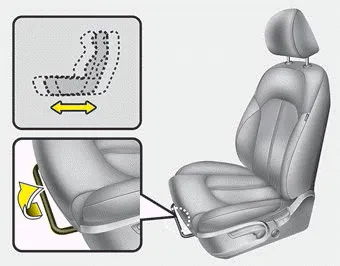
To move the seat forward or backward:
1. Pull the seat slide adjustment lever up and hold it.
2. Slide the seat to the position you desire.
3. Release the lever and make sure the seat is locked in place.
Adjust the seat before driving, and make sure the seat is locked securely by trying to move forward and backward without using the lever. If the seat moves, it is not locked properly.
Seatback angle
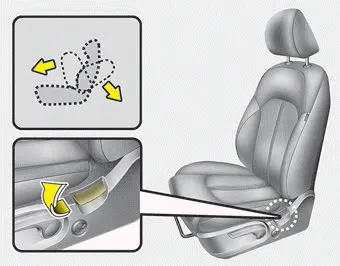
To recline the seatback:
1. Lean forward slightly and lift up the seatback recline lever.
2. Carefully lean back on the seat and adjust the seatback of the seat to the position you desire.
3. Release the lever and make sure the seatback is locked in place. (The lever MUST return to its original position for the seatback to lock.)
Seat height
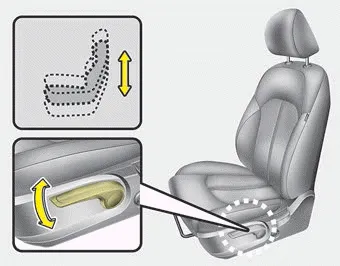
To change the height of the seat, move the lever upwards or downwards.
- To lower the seat cushion, push the lever down several times.
- To raise the seat cushion, pull the lever up several times.
Driver’s seat (1) Seat adjustment, forward / backward (2) Seatback recliner (3) Seat adjustment, height (4) Lumbar support (5) Driver position memory system (6) Headrest Front passenger’s seat (7) Seat adjustment, forward / backward (8) Seatback recliner (9) Seat cushion height (10) Headrest Rear seat (11) Armrest and Cup holder (12) Headrest (13) Seat-back release/folding lever WARNING - Loose objects Do not place anything in the driver's foot well or under the front seats.
The front seat can be adjusted by using the control switches located on the outside of the seat cushion. Before driving, adjust the seat to the proper position so you can easily control the steering wheel, pedals and switches on the instrument panel.
Other information:
Kia Optima DL3 2019-2026 Service and Repair Manual: Air Conditioning System
General safety information and caution Instructions (R-134a) When Handling Refrigerant 1. R-134a liquid refrigerant is highly volatile. A drop on the skin of your hand could result in localized frostbite. When handling the refrigerant, be sure to wear gloves.
Kia Optima DL3 2019-2026 Service and Repair Manual: In-car Sensor
Description and operation Description The In-car air temperature sensor is built in the heater & A/C control unit. The sensor contains a thermistor which measures the temperature of the inside. The signal decided by the resistance value which changes in accordance with perceived inside temperature, is delivered to heater co
Categories
- Manuals Home
- Kia Optima Owners Manual
- Kia Optima Service Manual
- Automatic Transaxle System
- Engine Mechanical System
- Body Electrical System
- New on site
- Most important about car
