
Kia Optima DL3: Brake System / Front Brake Caliper
Components and components location
| Components |
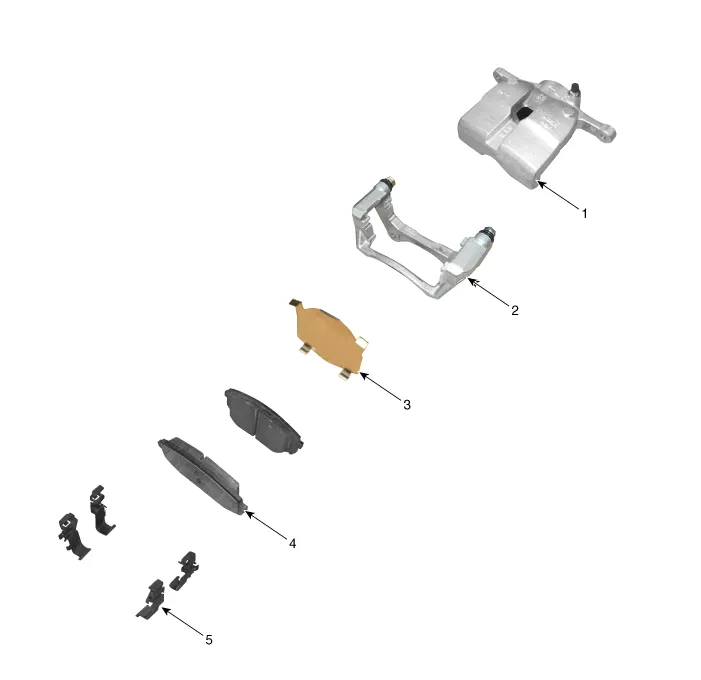
| 1. Caliper body 2. Caliper carrier 3. Pad inner shim |
4. Brake pad 5. Pad retainer |
Repair procedures
| Removal |
| 1. |
Disconnect the (-) battery terminal. |
| 2. |
Remove the front wheel and tire. (Refer to Suspension System - "Wheel") |
| 3. |
Remove the hose after loosening the brake hose bolt (A) from the caliper.
|


| 4. |
Remove the caliper body (A) by loosening the guide rod bolt.
|

| 5. |
Remove the pad retainer (A).
|

| 6. |
Remove the caliper carrier (A) by loosening the caliper mouniting bolts.
|
| 7. |
Remove the caliper carrier (A) by loosening the caliper mouniting bolts.
|

| Installation |
| 1. |
Install in the reverse order of removal. |
| 2. |
Use a SST (09581-11000) when installing the brake caliper assembly.
|

| 3. |
After installation, bleed the brake system. (Refer to Brake system - "Brake Bleeding Procedures") |
| 4. |
Check the brake oil leakage and pedal operating condition. |
Components and components location Components 1. Brake member assembly 2. Stop lamp switch 3. Brake pedal arm assembly 4.
Components and components location Components 1. Front Brake Caliper 2. Front Brake Disc 3. Front Axle Repair procedures Removal 1.
Other information:
Kia Optima DL3 2019-2026 Service and Repair Manual: Smart Key Antenna
Repair procedures Removal Interior Antenna 1 1. Disconnect the negative battery terminal. 2. Remove the surround view monitor (SVM) unit. (Refer to Advanced Driver Assistance System (ADAS) - "Surround View Monitor (SVM) Unit") 3.
Kia Optima DL3 2019-2026 Service and Repair Manual: Photo Sensor
Description and operation Description The photo sensor is located at the center of the defrost nozzles. The photo sensor contains a photovoltaic (sensitive to sunlight) diode. The solar radiation received by its light receiving portion, generates an electromotive force in proportion to the amount of radiation received which is
Categories
- Manuals Home
- Kia Optima Owners Manual
- Kia Optima Service Manual
- Air bag collision sensors
- Cooling System
- Engine Control / Fuel System
- New on site
- Most important about car
